Shipped by AI.Understood by you.
AI wrote the code faster than anyone could read it. That gap is comprehension debt. Forge starts from the outside: your app sends its events, logs and errors, Forge opens an issue with the evidence when a count crosses a threshold you can read, and after you ship, it measures what changed. Every answer is a count you can check.
Four strikes
What the smithy does that the hammer cannot.
Each strike below is a shipped surface, shown on its own screen. Counts say what they are counted over, and a source sits under every line.
Strike 01 · The anvil — where a strike leaves a mark
Name the journeys your users must finish. Forge counts who gets through.
Sign-up, checkout, the way from your landing page into the product: your app sends its events with your tracking key, and Forge counts every journey day by day. When the share that gets through falls past a threshold, an issue opens, its window, baseline and minimum volume written beside it.
forge.ambera.app/signal/ledgerline/issues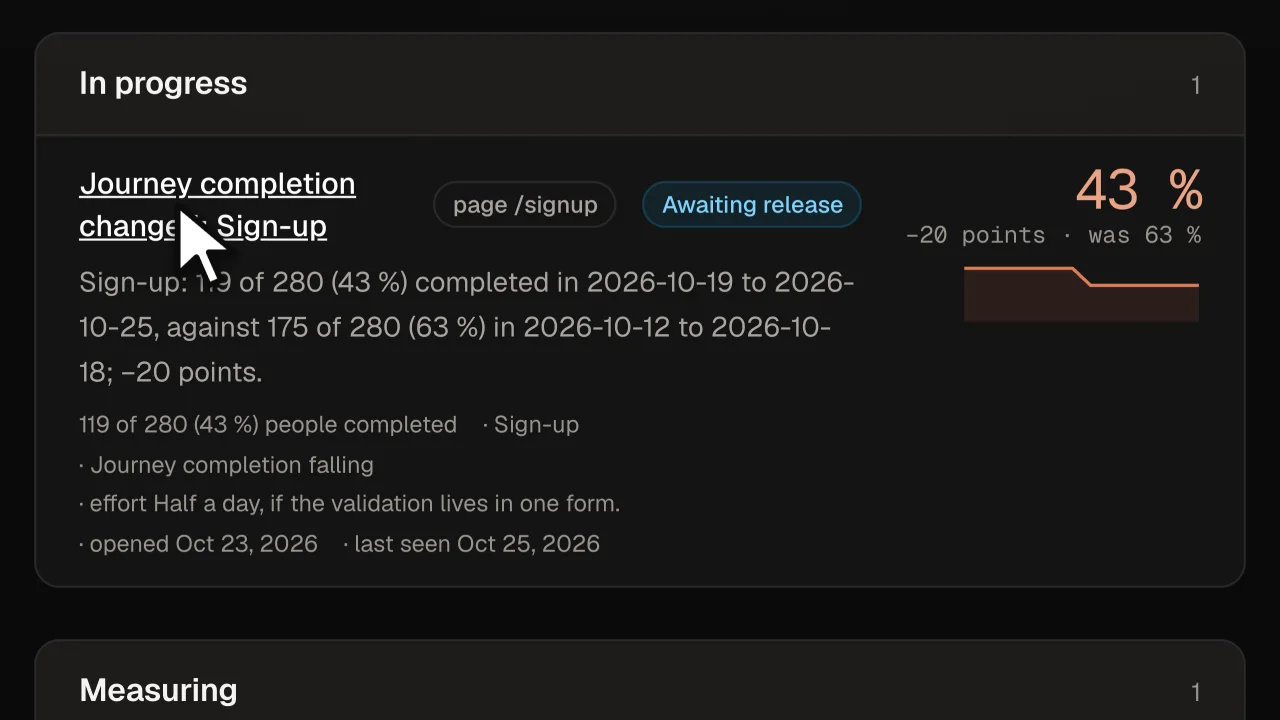
One row of the shipped Issues place over fixture rows: a journey’s figure, its last 14 days, the detector’s sentence.
Strike 02 · The forge — the tools laid out
The spec from the evidence, in your agent’s hands.
What to change and how you will know it worked, drafted from the stored rows. A number the evidence does not hold is marked, not believed. For your agent hands it to Claude Code or Cursor — Forge writes nothing to your repository.
forge.ambera.app/signal/ledgerline/issues/issue-2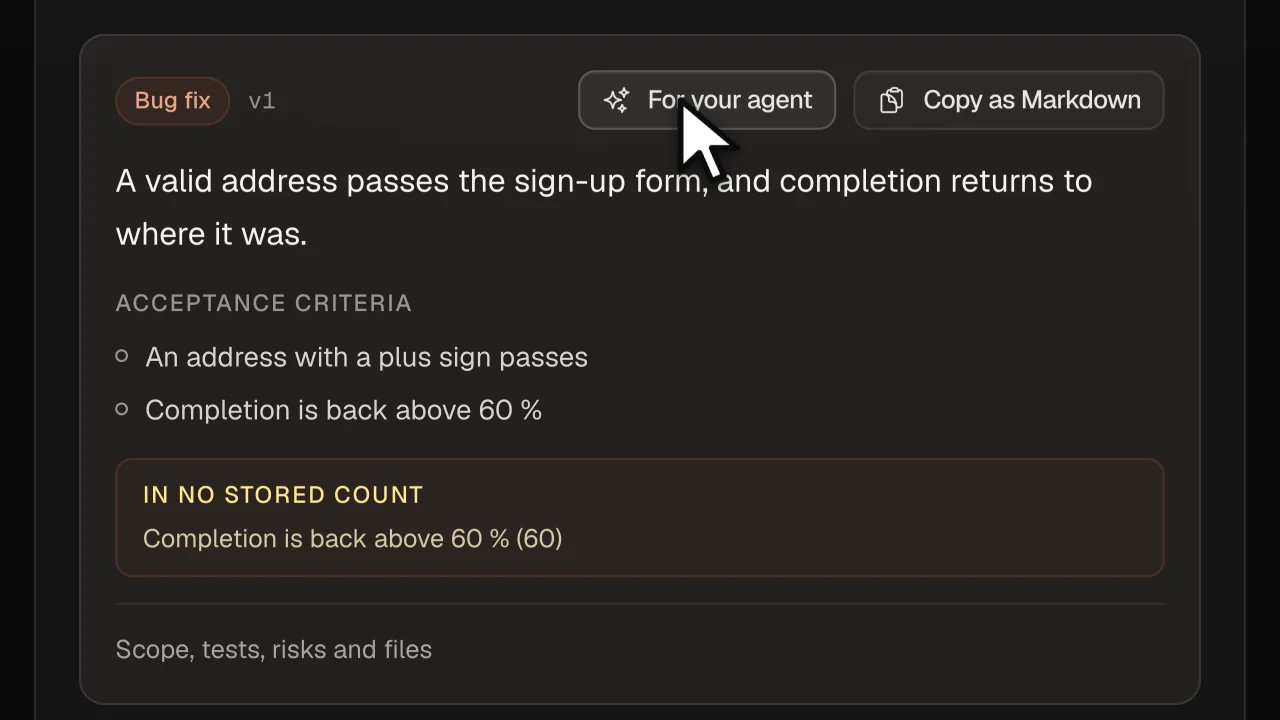
The shipped spec card over fixture rows: the target, the criteria, the number in no stored count, the hand-off.
Strike 03 · Tempering — counts that can fall
Did the release change the number? Forge counts it.
Your tracker sends the release with every event, so Forge knows the moment a version reached production. It compares the seven days before with the seven days after, under a plan written before anything shipped, and states what it saw: improvement, no change, or regression. Never “the fix worked”, because before-and-after is an observation, not proof.
forge.ambera.app/signal/ledgerline/outcomes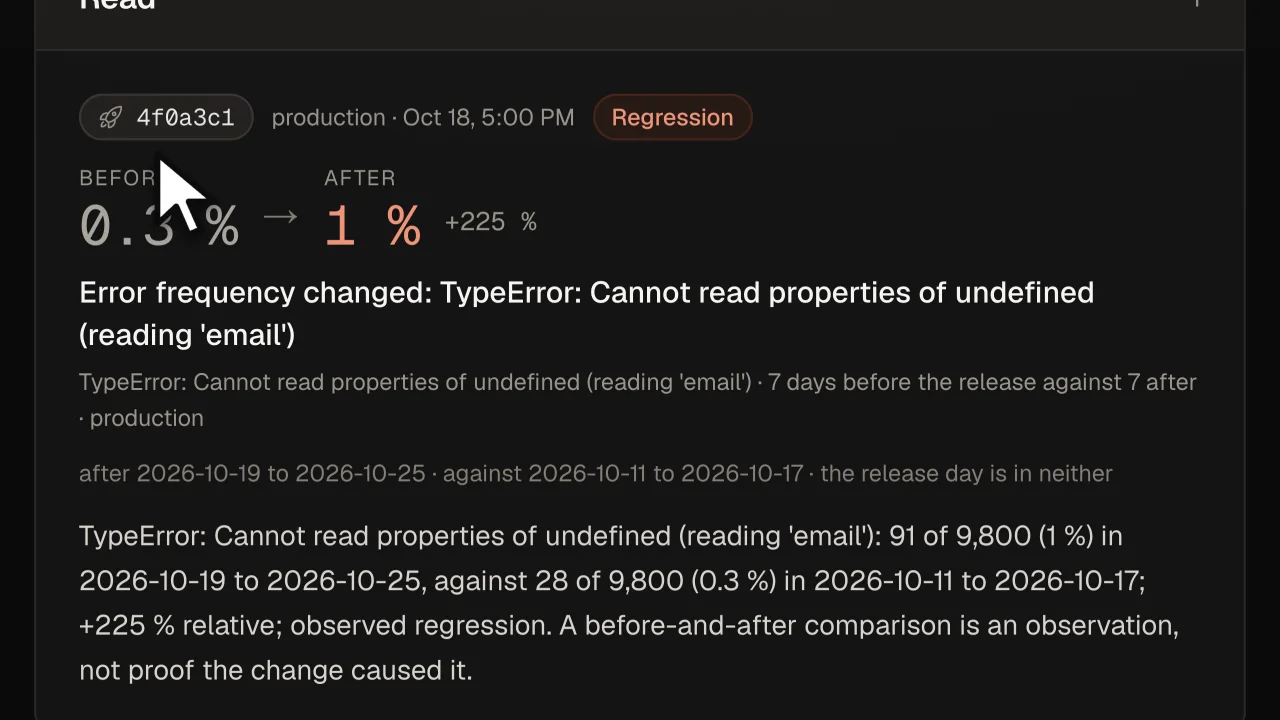
One row of the shipped Outcomes place: the release it measures, before and after, read as a regression.
Strike 04 · The ring — how the metal sounds
A week later, the numbers say what moved.
Events, errors and sessions against the week before, each in the colour of its side — more sessions green, more errors red, and errors also per thousand sessions, so a busy week is not read as a worse one. A week Forge does not fully hold is a sentence, never a zero.
forge.ambera.app/signal/ledgerline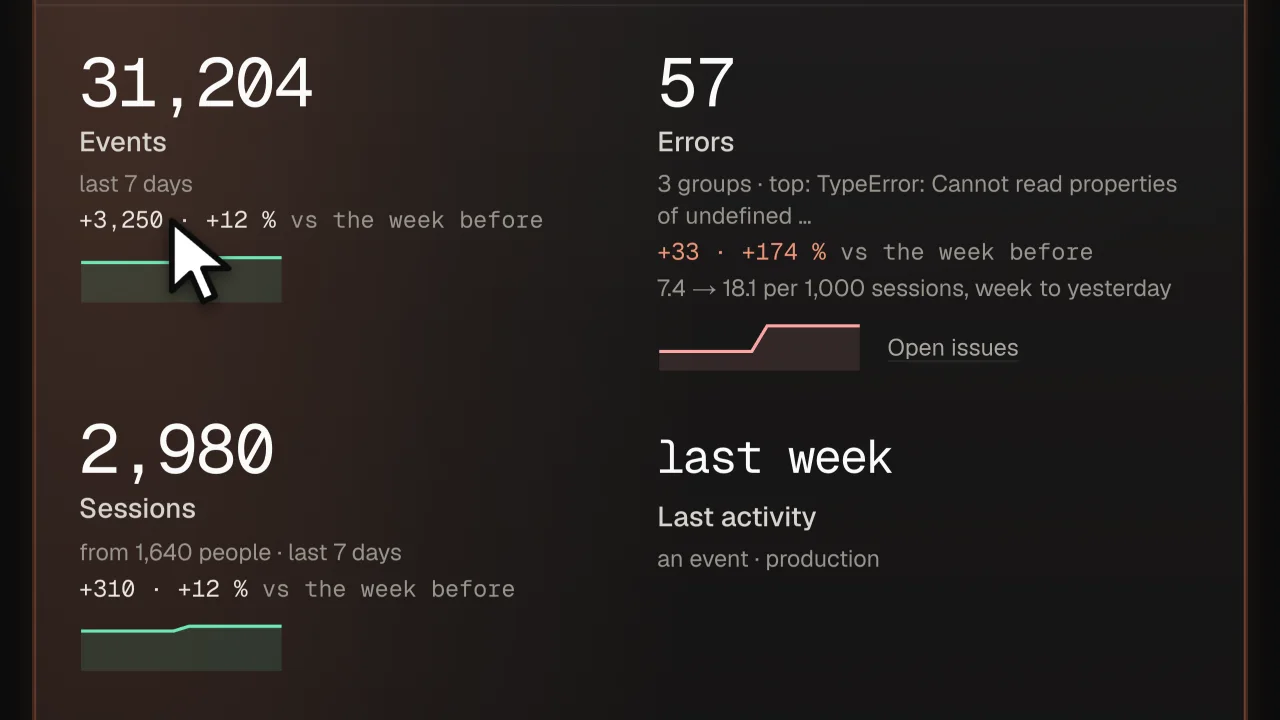
The shipped Overview strip over fixture rows: the week against the week before.
Each picture is one row or box of the product, no more: four from its own design harness over fixture rows and companies, every count computed by the shipped math, and the window from the public page as it stood on 30 October 2026.
Beside Sentry and PostHog
One release. One week.Three answers.
A release goes out. In the week after, one error on /signup triples and sign-up completion falls by a fifth. Here is what each one tells you — in its own shape, at its own moment — and where it stops.
- 18 Oct
- the release goes out
- 2891
- events of one error on /signup
- 63 %43 %
- sign-ups completed
4f0a3c1 · production · read from the rows your app sends
the 7 days after the release, against the 7 before
119 of 280, against 175 of 280 the week before
- Sentryminute 1
An alert, the moment the error is new.
New issue · TypeError: Cannot read properties of undefined (reading ’email’) · 91 events this weekThen — The stack trace, the release it first appeared in, a suggested fix as a pull request. Mark it resolved; it reopens if the error returns.
Stops at the pull request. It does not say that sign-up completion fell with the error, or by how much against the week before.
You bring the alert rule and its threshold.
- PostHogwhen you look
A chart, when you open it.
Sign-up funnel · 43 % completed · last 7 days · a replay of one person who droppedThen — An alert, if you set one on that insight. An experiment, if you put the fix behind a feature flag and split your users.
Stops at the chart, or at an experiment you design. It does not say which release moved the number, or whether a plain release moved it back.
You bring the funnel, the alert, the flag and the experiment.
- Forgeday 1 → day 8
A sentence with its denominator — and a second one after the release.
Day 1 · the issue opens
Journey completion changed · Sign-up: 119 of 280 (43 %) completed in 2026-10-19 to 2026-10-25, against 175 of 280 (63 %) in 2026-10-12 to 2026-10-18; −20 points · threshold 5 · minimum 50 · productionErrors on the same page: 77 from /signup in those 7 days, against 7 in the 7 before.
7 days — Your decision. A spec with the plan the outcome will be measured by, written before anything ships. The release, read from the rows your app sends — nobody marks it.
Day 8 · Forge comes back
RegressionTypeError (reading ’email’): 91 of 9,800 (1 %) in 2026-10-19 to 2026-10-25, against 28 of 9,800 (0.3 %) in 2026-10-11 to 2026-10-17; +225 % relative; observed regression.A before-and-after comparison is an observation, not proof the change caused it.
Comes back with the second sentence, and says beside it what it is.
You bring the decision.
Keep both. Forge is the one that comes back.
Forge beside SentryForge beside PostHogHow a release is measured
Start free
Bring the hammer. The smithy is lit.
Google, GitHub or an email. 1 product free, no card, no credits: add the snippet to your app, and the counts start with its first row.